Showing posts with label msp430. Show all posts

Sunday, 11 October 2015

mspdebug

When it comes to debugging programs, the first tool in my toolbox for compiled languages like C or C++ is usually 'print'. I don't tend to bust out a debugger unless I'm in an IDE such as IntelliJ.

This can pose problems for me in a relatively print-challenged environment, such as msp430 on Linux. Last night I had found myself in just this situation when I found myself musing on why the msp430 upload tool was called mspdebug. A quick search found a nice manual and a few minutes later I was debugging away.

Here's a sample transcript:

With the sketch already uploaded to the board, this script shows how to:

  • Generate a name-list from the sketch's Elf file
  • Import these symbols into the debugger
  • Set a breakpoint by name in the program
  • Run the sketch up to the breakpoint
  • Single-step the program once the breakpoint has been reached.
If you're interested, the sketch is a rather convoluted version of Blink.

Tuesday, 29 July 2014

RF24 with MSP430 revisited

Well it's taken longer than expected, but today the RF24 and RF24Network libraries are finally ready for use with MSP430. (Get them from GitHub as usual.)

The main improvement is to switch from using the C++-preprocessor to conditionally-compile debugging printf() statements, to explicitly configuring a debugging class into the sketch. For an example of its use, see the revamped pingpair sketch.

The advantage of this is that it allows other approaches to debugging, such as blinking LEDs (on platforms without serial ports) or using plain old Serial.print() on platforms too constrained to support printf(), such as the ATtinys. A secondary advantage is that it makes the mainline code easier to read.
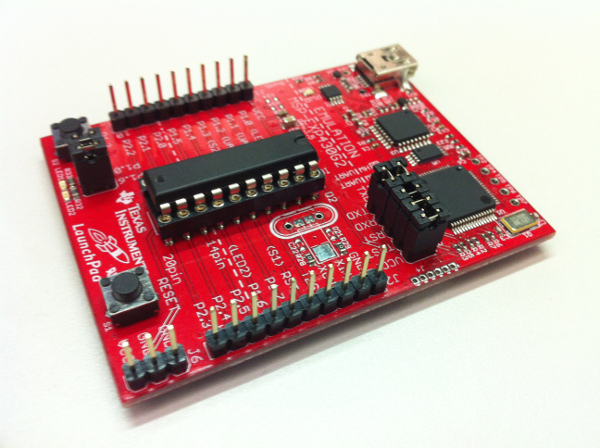
MSP430 (with jumpers set for Hardware UART)

Note that the MSP430 has a fairly restricted serial port itself, at least compared to what we're used to from Arduino. A long description can be found here, but suffice it to say that, as shipped, you have to change jumpers to see anything output by Serial.print() and what you get is limited to 9600 baud. This means that the very act of debugging can cause some of the examples to timeout, so caution is required!

Linux users are rewarded with an additional set of problems to deal with, as documented here. Follow the instructions from the section "Fix a Linux kernel bug..." to rebuild the relevant kernel driver. (Note that there are some existing patches floating around the network which no longer work because this driver has seen some updates recently --- my kernel is version 3.11).

Once the driver was patched, I found that the serial port is best accessed using minicom as root. (Furthermore the first attempt at an upload usually fails for me, although the second and subsequent ones succeed.)

Finally note that a quick smoke test showed these libraries working on the Fraunchpad and Stellarpad too, although serial port issues prevented me seeing any debugging info on these targets.

Sunday, 3 November 2013

Homebrew msp430 Development Board

While not exclusively devoted to AVR microcontrollers, this blog has concentrated on them for one simple reason: they are very easy to get started with. Whether for beginner (Arduino) or professional (GNU make and gcc), the software ecosystem is very mature. Furthermore, a proliferation of cheap Arduinos (and clones) means that even lack of hardware experience is no barrier to entry.

Texas Instruments has been relatively late to the party with their launchpad line of msp430-based microcontrollers and, until quite recently, a steep learning curve awaited the newcomer. That has all changed with the creation of an Arduino-compatible core for the msp430 and a fork of the Arduino software, Energia, which provides an experience almost indistinguishable from Arduino itself.
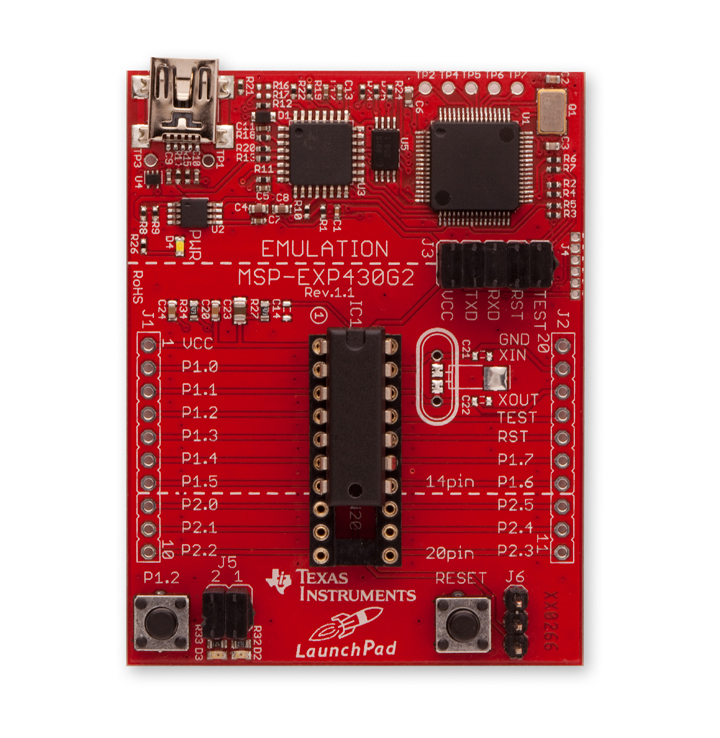
msp430 'launchpad' experimenter board

One further thing missing, until now, was ease of prototyping with the microcontrollers themselves outside of the launchpad development kits. The latter actually contain two microcontrollers, one to act as a usb programmer and the other to run user-programs. (While the first actually provides more features than that, that's all a beginner sees.) Thus a hobbyist wanting to use an msp430 for a real-world application had two choices: use the launchpad experimented board itself 'in the field', or program the microcontroller in the experimenter board and then move the newly programmed chip to its permanent home by hand. Easy field upgrades of firmware would require a more complex solution.

Such a solution has been in the works by members of the 43oh community for about a year now. This is a combined USB-stack (cf., v-usb) and bootloader which allows uploading of user programs via a simple USB cable. Only three resistors are required to support USB.

My hardware instantiation of this work (done entirely by others at 43oh and downloadable here) looks like this:
boot430 development board (with g2553)
The bootloader itself is bootstrapped using a development  board: I programmed all of my msp430s at one sitting! Once bootstrapped, user programs can be updated with a simple USB cable and a program called boot430.
Stripboard Layout

The final piece of the puzzle was programming one of these from Energia. Conventionally Energia uses an external program, mspdebug which unfortunately does not speak the same protocol as the USB bootloader. While it is unfortunately not currently possible to configure Energia to use a different uploader, this is a problem which the Arduino team has already encountered and solved in its still-beta version-1.5.

Thus, my somewhat-heretical solution to this problem (at Github): port the Energia launchpad cores back to Arduino, using the same software infrastructure as for the ATtiny development board described earlier. This seems to work quite well, although Arduino has still-unresolved issues in the area of libraries, which leads to confusion about which libraries are actually available on the current platform.