Monday, 19 January 2026

Scoping out a UK101

The first thing to measure when repairing a retrocomputer is the main oscillator. In a UK101, this is called CLK and found on U58 pin 3.

CLK (8MHz)

 This is divided by U29 and sent to the processor from pin 11 as Phi0 and reaches the counting chains as C0.

Phi0 (1Mhz)

The processor uses Phi0 to produce the processor clock Phi2. This is sent from U8 pin 39 to the hardware devices which populate the address and data buses.

Phi2 (1Mhz)

The counting chain is made up of U59, U60, U61 and U30. These divide C0 into C1-C15. About halfway along the chain are C8-C10, which are fed into the character generator's address lines A0-A2.

C8 (7.8kHz)

Ultimately this produces a Composite Video signal on J2 pin 12.

Video (15.5kHz)

So it's fairly certain that when this is connected to a monitor, there will be some sort of picture!

(This work also turned up an error in the serial clock generation. C3 (125kHz) is used to produce the transmit  clock TxCLK. However while the former is OK, the latter is missing: further investigation is required.)


Tuesday, 6 January 2026

Solving a simpler problem

Project Euler is a popular site among enthusiasts of mathematics and programming problems. A very common template for its problems goes something like:

Let F(n) be some function expressed in words. You are given that F(100) is some relatively small number. Find F(10^7).

 Often the best approach to such problems is to write a brute-force solution which gets the correct answer for the given data to verify that you understand the problem. Then examine the order of growth of this brute-force solution, say O(n^2), to determine what the best approach is, maybe O(n*log(n)), given that Project Euler says that all of its problems are solvable in under a minute.

This approach works well for software because it's easy to code up a brute-force solution and play around with it. It's not so useful for hardware for a similar reason: it isn't so easy to build hardware prototypes.

Nevertheless the MicroUK101 described last time was an attempt at a test-bed for those chips in the UK101 which weren't testable with Arduinos: the 6502 CPU and 6850 ACIA. A working MicroUK101 would verify that those chips were working too.

Unfortunately when assembled, it didn't work! Now what? Last time I tried to strip it back to the bare essentials required to test a 6502: a power supply, reset circuit and CPU clock. When this didn't work as expected, I had assumed that the 6502 had gone bad. This assumption was incorrect.

Time passed and recently I bought an OWON vds1022i USB oscilloscope and decided that an easy first task would be to fix the MicroUK101. Very quickly I discovered that the clock circuit wasn't oscillating at 4MHz as it ought to: according to the scope it was oscillating at 40MHz!

The simpler problem required another simpler problem: build the clock circuit on a bread-board and try to make it work there before making any changes to the PCB version. The problem turned out to be the 680R resistors in the clock oscillator: these did not provide the stability required, at least with the choice of crystal and 74LS04 I had on hand. Upping the resistors to 4k7 fixed the issue and with it the MicroUK101.

MicroUK101 by Grant Searle and Steve Gray

Incidentally if I were making changes to Steve Gray's PCB, I would drop the power switch and RS-232 interface, using only an FTDI adaptor to power the board and talk to it.

Friday, 14 June 2024

Testing a 6502 CPU

 It's relatively easy to test the UK101's discrete TTL chips using a simple Arduino-based IC Tester, and the ROMs can be read by an EPROM programmer but what to do about the more esoteric chips, i.e., the CPU and ACIA?

As CPUs go, the 6502 is a masterpiece of simplicity. It turns out that you can have it run the most basic of programs with no support logic whatsoever! This is the well-known NOP test, in which the CPU is fed an endless stream of No-Operation instructions, see for example here.


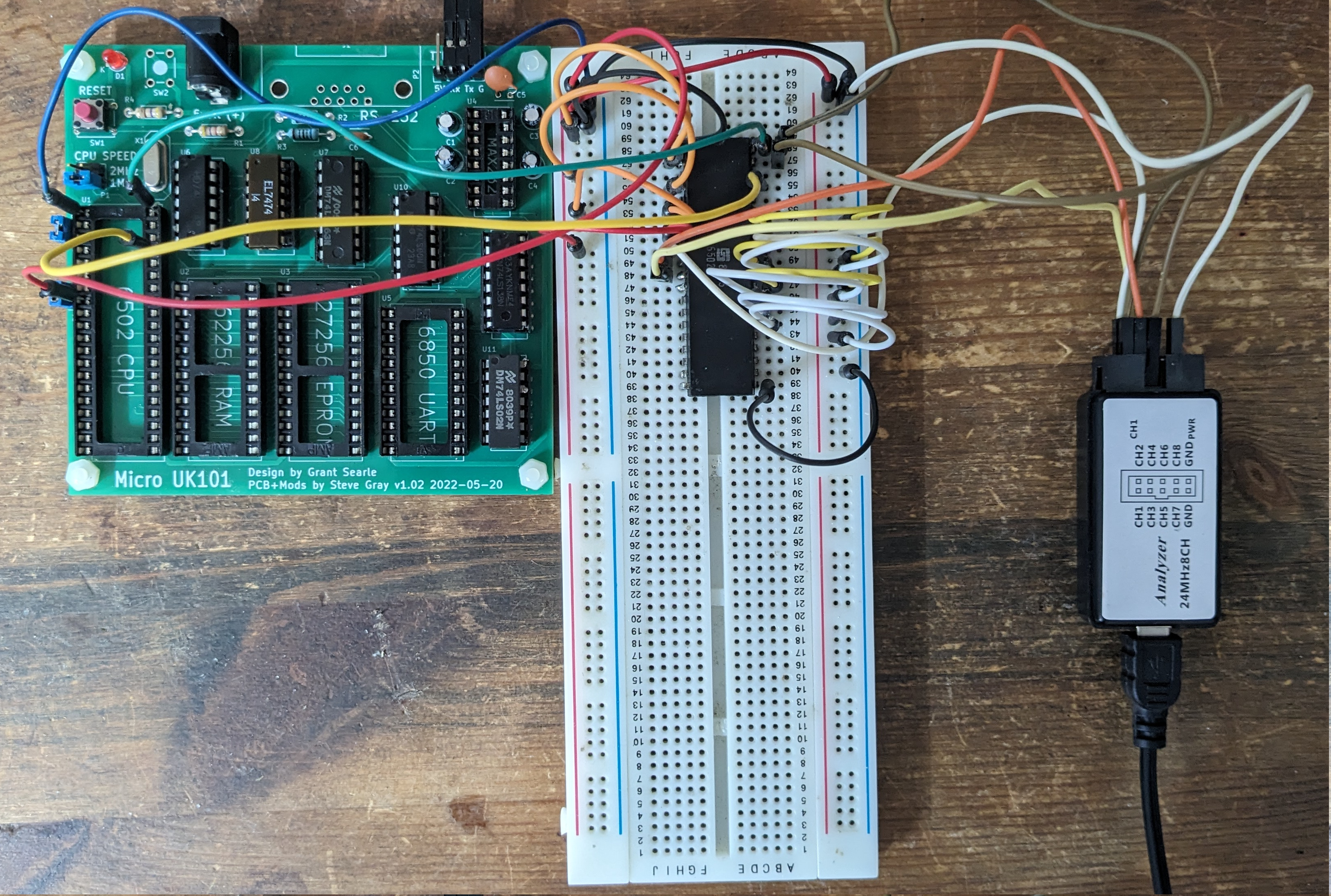
Breadboard 6502 flanked by Clock Circuit (L) and Logic Analyzer (R)

The image shows the test-set-up. The board on the left is a Micro UK101 which is only used as a power-supply, reset switch and clock source. (This is a more rewarding way of testing CPU and ACIA, but only if they both work!)

The CPU does not need many connections to run the NOP test: its data-bus is hard-wired to EA (the opcode for NOP), it also has IRQ and NMI tied high, and the input clock and reset line from the Micro UK101.
 
The logic analyser on the right is a cheap 8-channel model which works with PulseView. It is triggered by the reset pin (high-to-low transition) and samples A0, A1, A2 and the output clock.

When powered up and reset, the 6502 reads its reset vector at $FFFC and $FFFD. Unsurprisingly it reads the address $EAEA and jumps there. It then reads an endless stream of NOPs at every address between $0000 and $FFFF. Its address pins will show this.

Or they would show this, if the CPU was working. The screenshot below shows what happens most of the time:

Dead

The top trace is the reset line and the bottom one is the output clock, which seems to be working. The three lines in the middle are A0, A1 and A2 with nada.

However sometimes the CPU shows signs of life. About every 10 resets, there would be a short burst of activity for a few microseconds:
Some signs of life

So it looks as if this CPU is a goner. It was made by Synertek in the 35th week of 1980 and spent the last 40-odd years in a cold damp attic, where it expired: RIP.

Update: Hans Otten has written about NOP testers here.
Update #2: It seems my test-setup above was flakey and the CPU is actually OK: stay tuned!


Thursday, 14 March 2024

TommyPROM

Some time ago, I mentioned that I had been unable to test the various ROMs in the UK101, lacking an EPROM programmer. That has now been rectified, thanks to the fine work of Tom Nisbet, creator of TommyPROM

In addition to an Arduino sketch, the Github linked above hosts a couple of circuit boards, and I had them made as part of my last order from Seeed Studio.

TommyPROM with a very old 2716 EPROM

Populating this PCB cost under €10, quite the bargain. This version of the programmer can read 27-series EPROMs but can't manage the voltages required to program them.

Configuring the programmer requires editing the Arduino sketch for chip series and type, and uploading the modified sketch. This wouldn't pass muster in a commercial product but is absolutely fine for this project's target market: hobbyists on a budget.

Opening a serial port to the board shows the following menu:

Main Menu

Reading that EPROM, which is nearly 40 years old, produced the following output:

Amnesia?

Unsurprisingly, given its age, it seems to have lost its memory! Luckily it is not too difficult to find copies of UK101 (and Superboard) firmware online, Mark's Lab has copies for instance.

Burning old-school 27-series EPROMs requires more advanced hardware, and the second TommyPROM board I had made can do it, TommyPROM32. I will review that iteration when I have assembled it.

What the current version of TommyPROM can do is write to 28-series EEPROMs, e.g., an AT28C16. This is pin-compatible with the 2716 so once it arrives and has been programmed, the next step in testing the UK101 can be taken: hooking the board up to a logic analyser and spying on the data bus using another fine Open Source tool: 6502Decoder.

(I have several PCBs left over from that order. If you want one at cost, PM me.)

Update (April 2024): after some further investigation, it turns out that the basic TommyPROM can only handle 28-pin chips so any data retrieved from smaller chips (as above) won't be valid. TommyPROM32 is definitely the way to go here. Stay tuned for a review of that coming soon!


Sunday, 21 January 2024

Bodge Wiring

A bodge wire is defined as a "wire added to a PCB to fix errors in the layout or broken traces." The first is as a result of a design fault while the second arises from mistakes made in maintenance of an existing PCB.

Bodge wires don't introduce new functionality, they only restore intended functionality. Therefore they should be as unobtrusive as possible.

When restoring an old computer, bodge wires are frequently necessary to fix traces which have broken due to excessive heat during the desoldering of defective parts for replacement, most often ICs and IC sockets.

Bodge wires

When a trace lifts or breaks, I mark the PCB on the top-side with Tipp-Ex as a reminder that a bodge will be necessary sometime in the future. The bodge is then later made on the bottom-side of the board, to keep things tidy.

Bodges required!

It can be useful to differentiate bodge wires from wires adding functionality by colour, or adding functional wires to the top-side of the board.

Kynar wire, Wire stripper and Magnifier

Essential tools for this are 30 AWG Kynar wire, a Wire Stripper and Eye magnification of some kind. Care is needed to ensure that the correct joints on the bottom-side are actually the correct ones. Check your work with a continuity tester!

Some useful additional tips in the EEVblog.

Tuesday, 9 January 2024

Testing ICs


It seems like about two years ago, IC testers made quite a splash, judging by reviews of the Retro Chip Tester Pro (Adrian's Digital Basement) and the BackBit Chip Tester Pro (Noel's Retro Lab). Nice products though they are, they are a little out of my price range for this project.

TTL testing

Luckily for my wallet, there are several DIY projects out there which can be assembled from commonly-available parts in not too long. Nick Gammon (who's excellent interrupt and power-saving pages were inspiration for my Interrupted project) has a super-simple one which can be assembled on a breadboard in about an hour for the cost of 16 resistors, some dupont connectors and an Arduino Uno!

It ain't pretty but it works!

Nick credits an Instructable by one "JorBi" for inspiration for his work. That project is more elaborate, using an Arduino Nano and a display --- Nick's just uses the Arduino serial port, nothing wrong with that. JorBi's project also provided the data file containing the actual chip tests: JorBi stores this in an EPROM while Nick puts it in the on-chip flash.

Another tester of note is the Smart-IC-Tester: an Arduino shield with TFT display. This stores the test database on an SD card, in a format very similar to JorBi's, just adding a one-line description to each part.

So? Well out of 34 74-series TTL chips on the UK101, Nick's tester flagged 7 as bad, 15 as good, 4 were unknown and 8 not tested, due to having wires soldered to them. Not bad for a day's work!

The bad chips were as follows:

  • Two 74125s
  • Three 74123s (all from the same batch)
  • One 7403
  • One 7404 (in bad shape, one pin broke off in the socket)
Note, it could be that the 74123 and 74125 tests are incorrect. I have none which tested good.

Update: After playing with the IC-Tester for a while longer, I managed to add tests for the hitherto-unknown chips. The latest score is 9 bad, 22 good and 3 not tested. My fork of Nick's repo is here.

Update 2: I built this circuit on a piece of vero board and piggy-backed it onto my home-brew Uno!
An improvement anyway!

Memory testing

In addition to the discrete TTL chips, the UK101 also had 32 2114 static RAM for main memory and another 4 for the display. Nick's tester is unable to test this IC. Luckily somone named "skjerk" has written a sketch for the Arduino Uno which does exactly this.

The 2114 has a pretty bad rep when it comes to living into old age so I didn't hold out much hope for my set. Rather incredibly however they all came up good!

Untested so far

Chips which I haven't been able to test yet:
  • The 6502 and 6851
  • The Basic ROMs and Character Generator ROM
  • The monitor EPROM

Given an EPROM programmer, it should be possible to read the ROMs and compute their checksums. Stay tuned for that!

Of course the two commercial testers mentioned above can test all of these chips, out-of-the-box. But where's the fun in that?

Thursday, 7 December 2023

Desoldering stuff

Progress? Maybe!


Last time, the next planned step was to remove all of the bodges and restore the machine to something resembling a "factory configuration". This aim has changed slightly: a lot of the bodges are gone but some remain:
  • The 48x32 display mod was just too tricky to undo without a display to test it against.
  • Similarly will leave the 300/600 baud and RS-232 mods until a later time.
  • The monitor switch mod also stays until the EPROM has been verified to work.
So what has been done here?
  • The piggybacked RAM and its decoding logic is history. New sockets were added where necessary.
  • The 6522 VIA board is also gone.
  • A new expansion socket was added to facilitate testing with a Logic Analyzer.
To replace the IC sockets I found the following tools essential:
  • Soldering Iron and solder
  • Desoldering pump
  • Headband Magnifier
  • Bench vise
Don't expect existing IC sockets to survive this process! 
  1. Use the desoldering pump to remove most of the solder; this helps free some of the pins but others will probably remain attached. 
  2. Gently lever the socket away from the board: it will likely break, leaving some pins in place. 
  3. Desolder these one by one. 
  4. Some VIAs will most likely remain at least partially full of solder. To clear them, mount the board vertically in the bench vise and heat each VIA from one side while applying the desoldering pump from the other. It may be necessary to fill the VIA with solder before attempting to clear it, counter-intuitive but it works!
  5. When inserting a new socket do not use force. If it doesn't go in easily, repeat step 4 until it does!
To desolder an unsocketed chip:
  1. Use the pump to remove most of the solder as before.
  2. With a small screwdriver gently push each pin until a click is heard. This means the pin is mostly free of solder.
  3. From the other side of the board, gently lever the chip away from the board. If it doesn't move, mount the board vertically as before, heat the pins on the chip side while applying the desoldering pump from the other. Repeat!
This all requires patience, and a steady hand! 

Flux pen, Desoldering braid and Pump

I also ordered a flux pen and desoldering braid which should be as good or better as the desoldering pump. However I wasn't able to get good results with it. Perhaps my soldering iron isn't hot enough?

Adrian's Digital Basement has a great tutorial on this subject. He also has better tools than I do!